ch8.convolution_to_generalize
Ch 8. Using convolutions to generalize
The Case for Convolutions in Neural Networks
Convolutions address the limitations of fully connected networks by preserving local spatial relationships and enabling translation invariance in image classification tasks.
1. Why Convolutions?
✅ Local Feature Extraction
- Instead of treating the image as a flattened 1D vector, convolutions operate on small neighborhoods of pixels.
- A kernel (filter) scans the image, capturing patterns like edges, textures, and shapes.
✅ Translation Invariance
- The same filter is applied across the entire image, so patterns can be detected regardless of their position.
- Unlike a fully connected network, the model doesn’t need to memorize pixel positions.
✅ Fewer Parameters
- In a fully connected model, every pixel connects to every other pixel → leads to millions of parameters.
- With a convolutional layer, the number of parameters depends only on the filter size (e.g., 3×3, 5×5 kernels).
What is a Convolution?
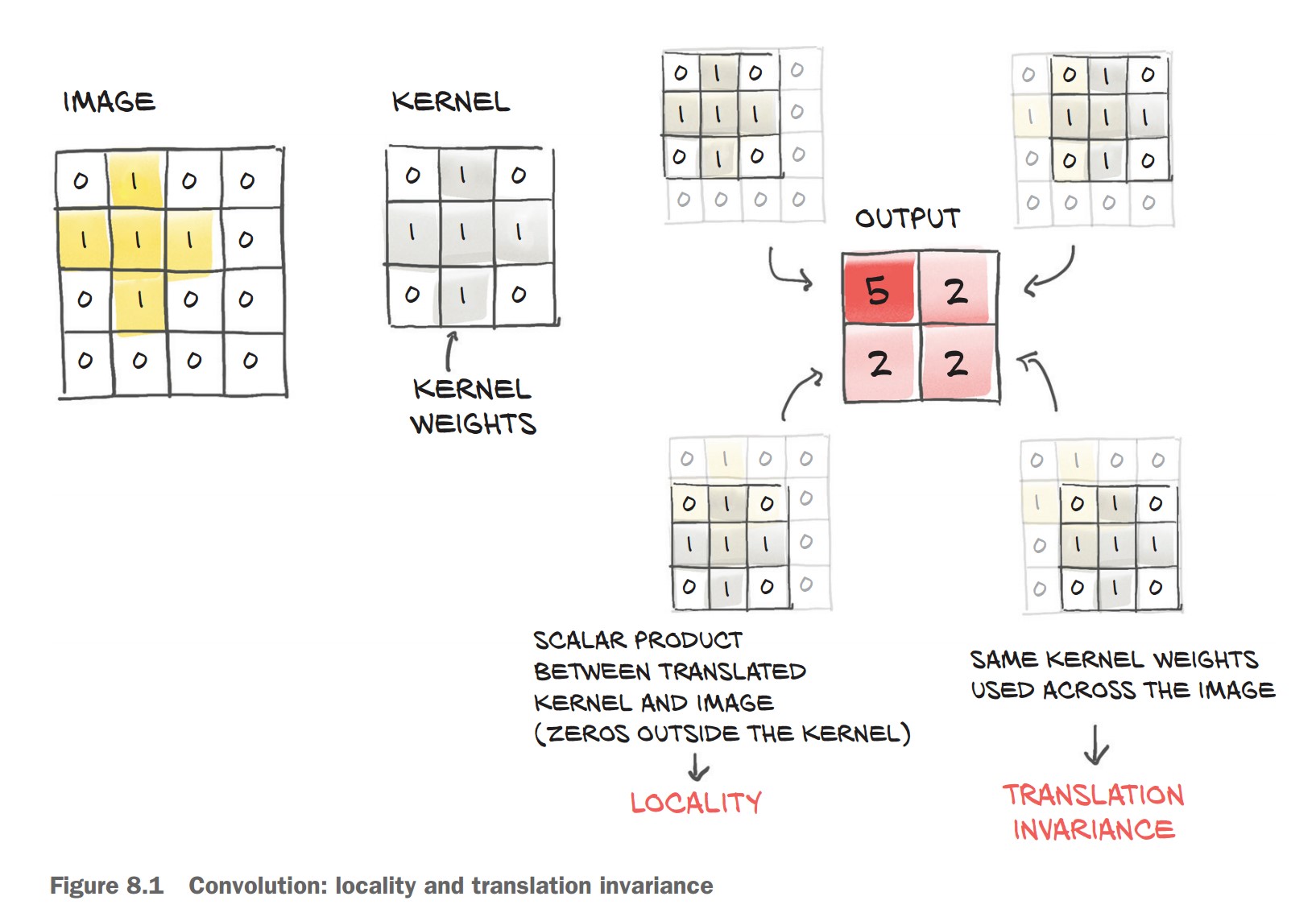
🔹 Mathematical Definition
- A convolution takes a small weight matrix (kernel) and slides it over the image.
- At each step, it performs an element-wise multiplication between the kernel and the corresponding region of the image, summing the results.
Given a 3×3 filter:
weight = torch.tensor([[w00, w01, w02],
                       [w10, w11, w12],
                       [w20, w21, w22]])
And a single-channel (grayscale) image:
image = torch.tensor([[i00, i01, i02, i03, ..., i0N],
                      [i10, i11, i12, i13, ..., i1N],
                      [i20, i21, i22, i23, ..., i2N],
                      [i30, i31, i32, i33, ..., i3N],
                      ...
                      [iM0, iM1, iM2, iM3, ..., iMN]])
An output pixel is computed as:
o11 = (i11 * w00) + (i12 * w01) + (i13 * w02) +
      (i21 * w10) + (i22 * w11) + (i23 * w12) +
      (i31 * w20) + (i32 * w21) + (i33 * w22)
This process is repeated for every pixel in the image by sliding the filter over it.
How Convolutions Solve Our Problems
🔹 Preserve Local Information → Focus on small regions instead of treating the entire image as a single vector. 🔹 Translation Invariance → Detects patterns anywhere in the image, reducing the need for excessive data augmentation. 🔹 Parameter Efficiency → Instead of learning millions of connections, the model learns a small set of reusable filters.
Convolutions in Action
Convolutional layers in PyTorch provide an efficient way to extract local features from images while maintaining translation invariance.
1. Using nn.Conv2d for Image Data
- Handles 2D image data (height × width).
- Preserves spatial structure unlike fully connected layers.
- Learns local patterns (edges, textures, shapes).
✅ Defining a Convolutional Layer
import torch.nn as nn
conv = nn.Conv2d(in_channels=3, out_channels=16, kernel_size=3)
print(conv)
Conv2d(3, 16, kernel_size=(3, 3), stride=(1, 1))in_channels=3→ RGB input image.out_channels=16→ 16 filters for feature extraction.kernel_size=3→ 3×3 filters scanning the image.
2. Checking Convolution Weights and Biases
Each output channel (feature map) learns a 3×3×3 filter (3 input channels × 3×3 spatial region).
conv.weight.shape, conv.bias.shape(torch.Size([16, 3, 3, 3]), torch.Size([16]))
(16, 3, 3, 3)→ 16 filters, each of size 3×3×3.(16,)→ One bias per output channel.
3. Applying Convolution to an Image
Step 1: Load an image from CIFAR-2 dataset
img, _ = cifar2[0]Step 2: Add batch dimension (required for nn.Conv2d)
img = img.unsqueeze(0) # Shape: (1, 3, 32, 32)Step 3: Pass image through the convolutional layer
output = conv(img)
print(img.shape, output.shape)
(torch.Size([1, 3, 32, 32]), torch.Size([1, 16, 30, 30]))- The output height and width are reduced from 32×32 to 30×30 due to the 3×3 kernel (without padding).
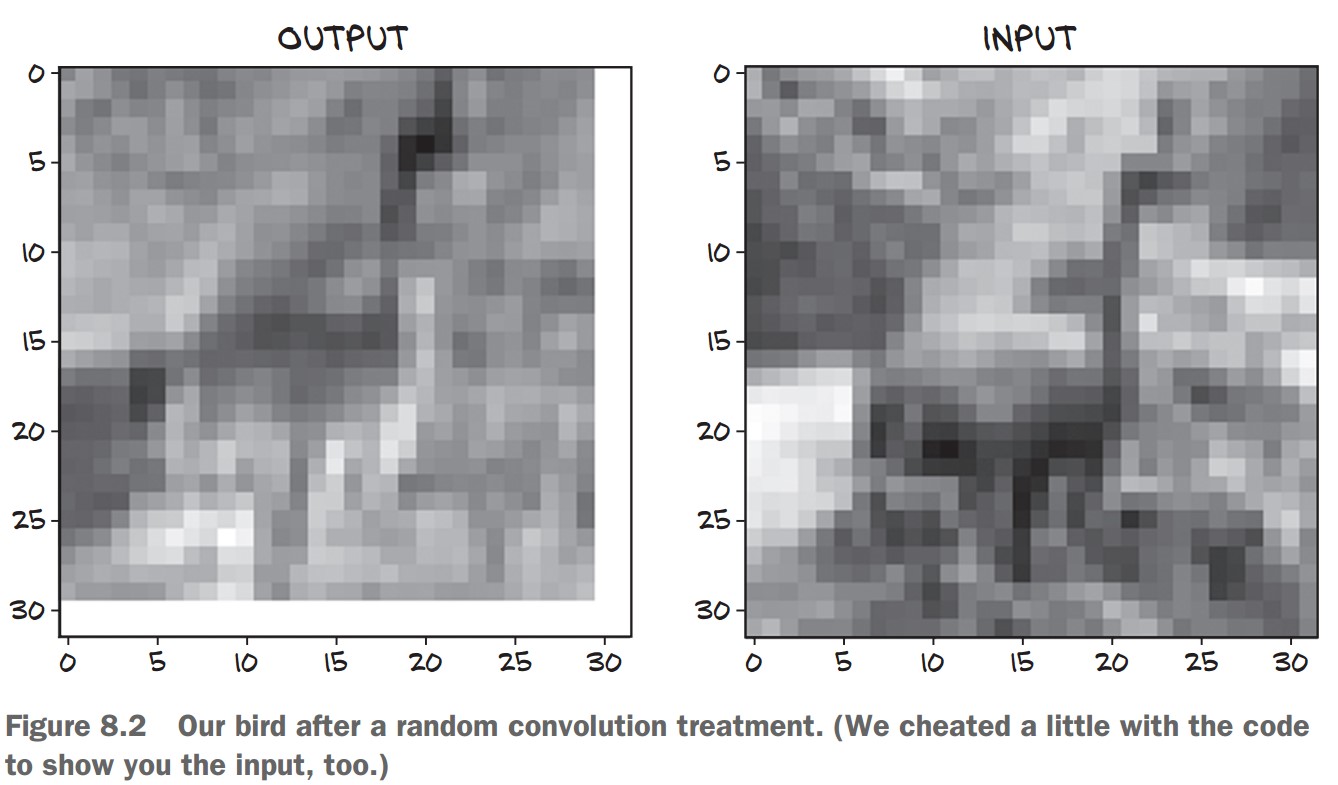
4. Visualizing the Convolution Output
To see how the first filter transforms the image:
import matplotlib.pyplot as plt
plt.imshow(output[0, 0].detach(), cmap='gray')
plt.show()
output[0, 0]→ First feature map from the 16 filters..detach()→ Removes gradient tracking for visualization.cmap='gray'→ Displays in grayscale.
This shows how a single convolution filter highlights patterns in the image! 🎯
Padding in Convolutional Layers
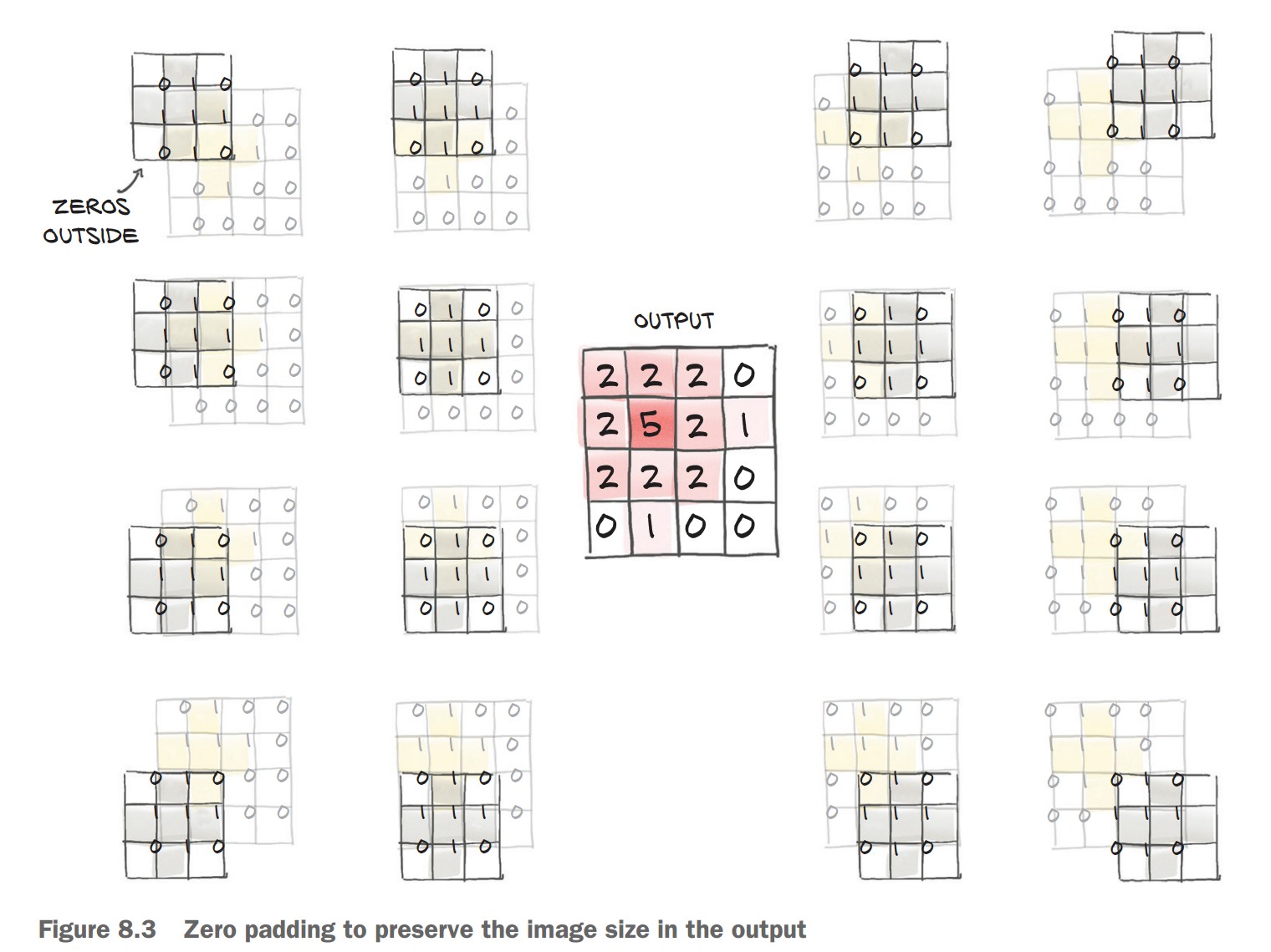
Padding helps preserve the spatial dimensions of an image after applying a convolution operation.
1. Why is Padding Needed?
✅ Convolution Reduces Image Size
- A 3×3 filter moves over the image, requiring a 1-pixel border on all sides.
- This reduces the output size by 2 pixels per dimension (
H_out = H_in - kernel_size + 1).
✅ Padding Adds Ghost Pixels
- Padding = 1 adds a 1-pixel border of zeros around the image.
- This ensures the output has the same size as the input.
📌 Without Padding (kernel_size=3)
conv = nn.Conv2d(3, 1, kernel_size=3)
output = conv(img.unsqueeze(0))
print(output.shape)
Output: (1, 1, 30, 30) (reduced size)
📌 With Padding (padding=1)
conv = nn.Conv2d(3, 1, kernel_size=3, padding=1)
output = conv(img.unsqueeze(0))
print(output.shape)
Output: (1, 1, 32, 32) (same size as input)
2. Benefits of Padding
✅ Keeps Image Size Unchanged
- Ensures output size matches input for easy comparison.
✅ Prevents Information Loss at Borders
- Without padding, pixels near edges are underrepresented.
✅ Maintains Compatibility for Advanced Architectures
- Needed for skip connections (e.g., U-Nets, ResNets).
3. No Change in Parameters
- Padding does not affect the number of trainable parameters in the model.
- The weights and biases remain unchanged.
conv.weight.shape, conv.bias.shapeOutput:
(torch.Size([1, 3, 3, 3]), torch.Size([1]))
🚀 Padding is essential for deep learning models that need consistent image sizes and improved feature extraction near edges!
Detecting Features with Convolutions
Convolutions allow us to detect patterns such as edges, textures, and shapes in images.
1. Manually Setting Convolution Weights
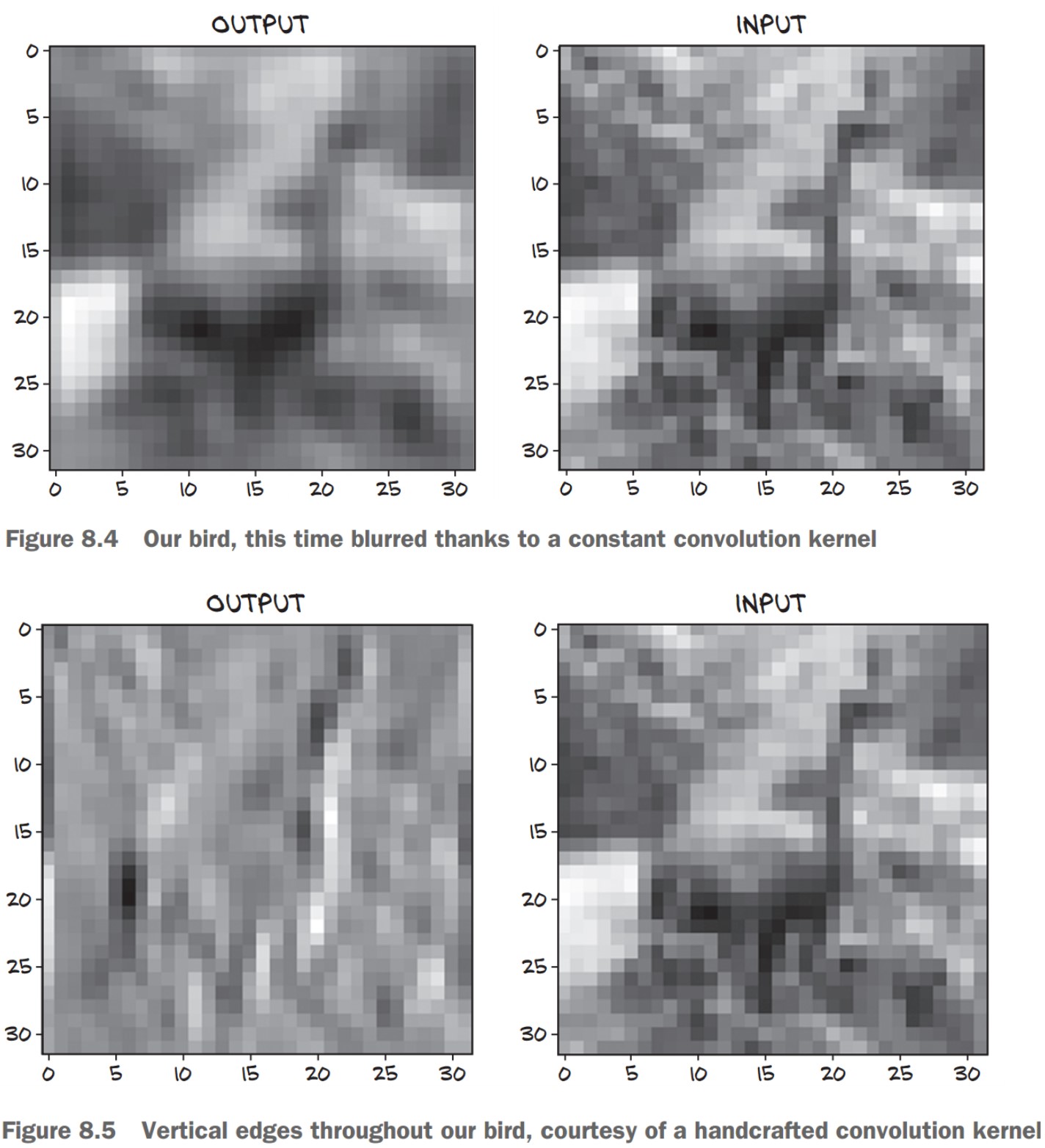
🔹 Blurring (Smoothing) Filter
- Each output pixel is the average of its 3×3 neighbors.
- This removes sharp variations and smooths the image.
with torch.no_grad():
    conv.bias.zero_()  # Remove bias
    conv.weight.fill_(1.0 / 9.0)  # Set all weights to 1/9
output = conv(img.unsqueeze(0))
plt.imshow(output[0, 0].detach(), cmap='gray')
plt.show()
🖼 Effect: Produces a blurred version of the image.
2. Edge Detection Using Convolutions
🔹 Vertical Edge Detector Kernel
- Highlights vertical edges by computing the difference between left and right pixels.
conv = nn.Conv2d(3, 1, kernel_size=3, padding=1)
with torch.no_grad():
    conv.weight[:] = torch.tensor([
        [-1.0, 0.0, 1.0],
        [-1.0, 0.0, 1.0],
        [-1.0, 0.0, 1.0]
    ])
    conv.bias.zero_()
📌 How It Works:
- Computes differences between right and left neighbors.
- Detects sharp intensity changes, which indicate edges.
🖼 Effect: Enhances vertical edges in an image.
3. Learning Filters in Deep Learning
🔹 Historically, humans designed filters for different tasks like edge detection and texture analysis. 🔹 With deep learning, CNNs learn the best filters automatically during training.
✅ CNN Layers Learn Different Features
- Early layers detect edges and textures.
- Deeper layers detect shapes and objects.
The Need for Pooling (Downsampling)
🔹 Why do we need downsampling?
- Small kernels (3×3, 5×5) detect fine details, but we also need to recognize larger patterns.
- Instead of using large kernels (which lose locality & increase parameters), we stack multiple convolution layers with downsampling in between.
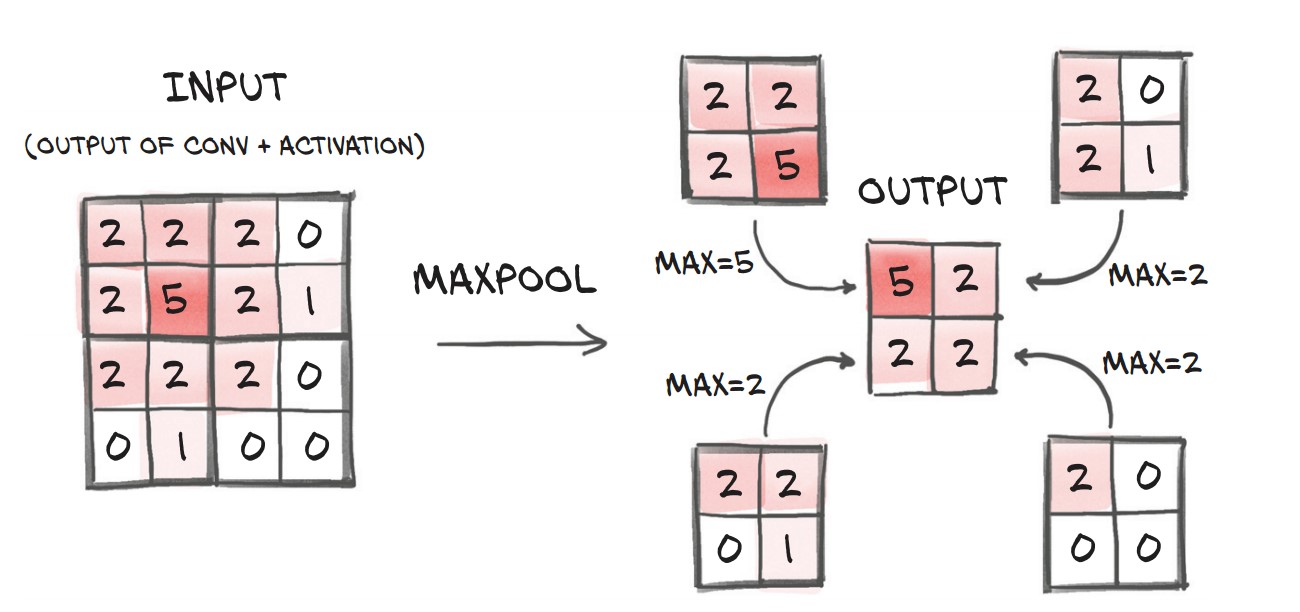
🔹 How do we downsample?
- Average Pooling: Takes the mean of neighboring pixels.
- Max Pooling (Most common): Keeps the strongest feature (highest value).
- Strided Convolutions: Skips pixels when computing output, keeping more information than pooling.
✅ Max Pooling is widely used since it preserves important features while reducing size.
pool = nn.MaxPool2d(2)  # Pool over 2x2 regions
output = pool(img.unsqueeze(0))
print(img.unsqueeze(0).shape, output.shape)
📌 Effect: Input (32×32) → Output (16×16)
Stacking Convolutions & Pooling
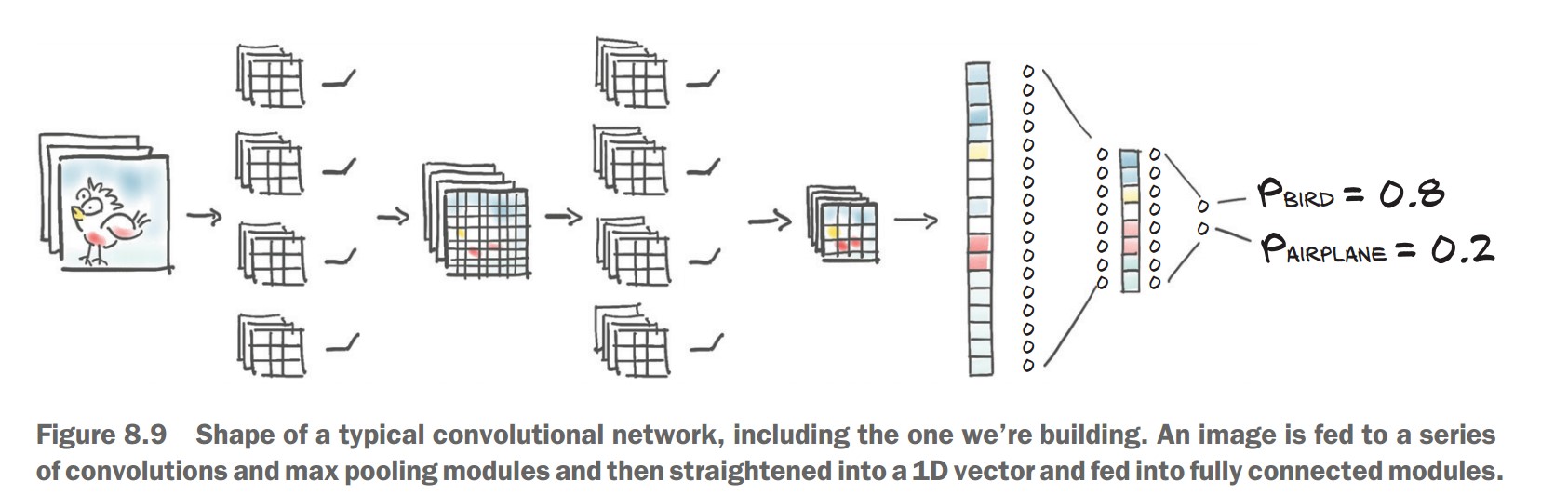
Key Idea: Each layer extracts features at different scales.
- First layers detect edges & textures.
- Deeper layers detect shapes & objects.
📌 CNN Structure:
- First convolution layer increases channels from 3 (RGB) → 16 feature maps.
- Then activation (Tanh) and Max Pooling (downsampling).
- Another convolution + activation + pooling, reducing spatial size further.
model = nn.Sequential(
    nn.Conv2d(3, 16, kernel_size=3, padding=1),  # 32x32 → 32x32 (16 channels)
    nn.Tanh(),
    nn.MaxPool2d(2),  # 32x32 → 16x16

    nn.Conv2d(16, 8, kernel_size=3, padding=1),  # 16x16 → 16x16 (8 channels)
    nn.Tanh(),
    nn.MaxPool2d(2),  # 16x16 → 8x8
)
✅ This structure helps CNNs recognize larger objects by building features from small patterns.
Transitioning to Fully Connected Layers
🔹 Problem:
- CNN layers output 8×8 feature maps, but our classifier needs a 1D vector.
- We must flatten the output before feeding it into fully connected (linear) layers.
🔹 Solution: Use view() to reshape output
nn.Linear(8 * 8 * 8, 32),  # 8x8x8 features → 32 neurons
nn.Tanh(),
nn.Linear(32, 2)  # Final layer: 2 outputs (Bird vs. Airplane)
⚠️ Missing Step (Error Fixing):
Before passing to nn.Linear, we need to flatten (view() is needed inside forward(), but nn.Sequential lacks explicit visibility).
Subclassing nn.Module for Custom Neural Networks
1. Why Subclass nn.Module?
✅ Flexibility: Allows defining custom forward passes beyond just sequential layers.
✅ More Control: Useful for complex architectures, e.g., residual connections (ResNets).
✅ Custom Computation: Needed for non-standard operations (like reshaping before nn.Linear).
2. Creating a Custom CNN Class
We replace nn.Sequential with a subclassed model where we define forward().
📌 Steps:
- Initialize layers in
__init__. - Define forward pass explicitly.
import torch.nn as nn

class Net(nn.Module):
    def __init__(self):
        super().__init__()
        self.conv1 = nn.Conv2d(3, 16, kernel_size=3, padding=1)
        self.act1 = nn.Tanh()
        self.pool1 = nn.MaxPool2d(2)

        self.conv2 = nn.Conv2d(16, 8, kernel_size=3, padding=1)
        self.act2 = nn.Tanh()
        self.pool2 = nn.MaxPool2d(2)

        self.fc1 = nn.Linear(8 * 8 * 8, 32)  # Flattened output
        self.act3 = nn.Tanh()
        self.fc2 = nn.Linear(32, 2)  # Output (2 classes: Bird/Airplane)

    def forward(self, x):
        out = self.pool1(self.act1(self.conv1(x)))  # Conv → Activation → Pool
        out = self.pool2(self.act2(self.conv2(out)))
        out = out.view(-1, 8 * 8 * 8)  # Flatten before `nn.Linear`
        out = self.act3(self.fc1(out))
        out = self.fc2(out)
        return out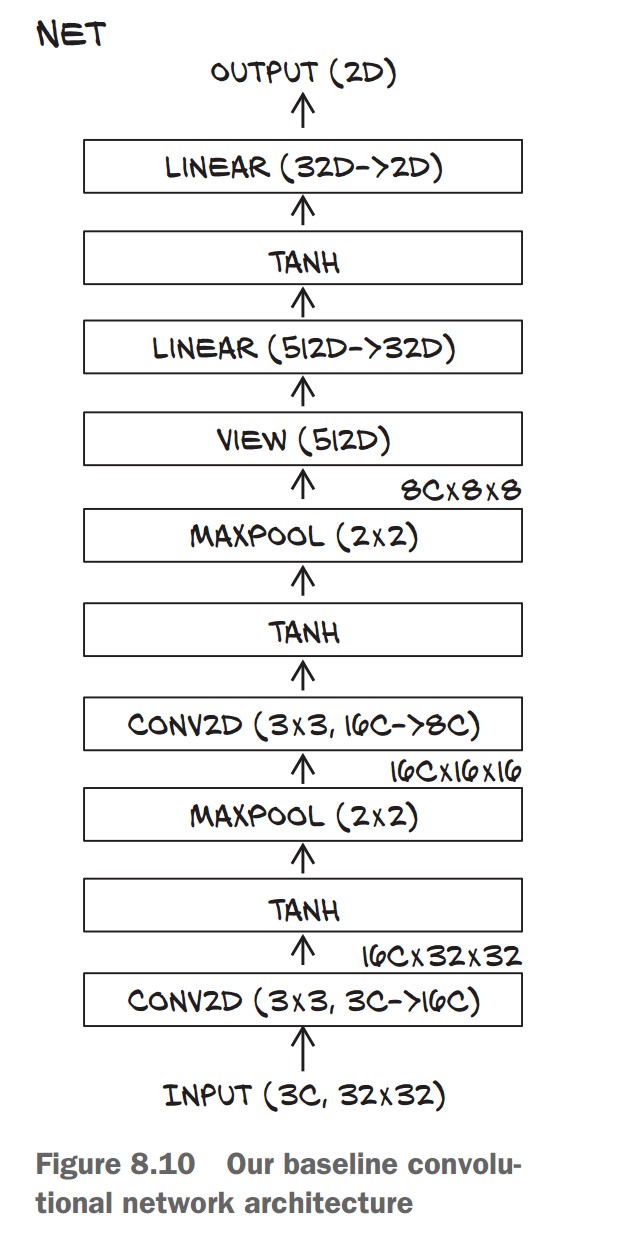
✅ Key Changes from nn.Sequential:
- Added
view(-1, 8 * 8 * 8)to reshape beforeLinear. - Layers stored as attributes (
self.conv1, etc.) instead of being listed in a container.
3. How PyTorch Tracks Parameters
🔹 Automatically registers layers as submodules when assigned in __init__.
🔹 We can access all parameters using:
model = Net()
num_params = sum(p.numel() for p in model.parameters())
print("Total Parameters:", num_params)
✅ This recursively collects parameters from all submodules (e.g., Conv2d, Linear).
⚠️ Submodules must be top-level attributes!
- Avoid storing layers in lists or dictionaries, or PyTorch won’t track them.
- If needed, use
nn.ModuleListornn.ModuleDict.
4. Using the Functional API (torch.nn.functional)
✅ Why use it?
- No internal state (no parameters).
- Simplifies non-trainable layers (e.g.,
Tanh,MaxPool2d).
🔹 Refactoring forward() with Functional API
import torch.nn.functional as F

class Net(nn.Module):
    def __init__(self):
        super().__init__()
        self.conv1 = nn.Conv2d(3, 16, kernel_size=3, padding=1)
        self.conv2 = nn.Conv2d(16, 8, kernel_size=3, padding=1)
        self.fc1 = nn.Linear(8 * 8 * 8, 32)
        self.fc2 = nn.Linear(32, 2)

    def forward(self, x):
        out = F.max_pool2d(torch.tanh(self.conv1(x)), 2)  # Use functional API
        out = F.max_pool2d(torch.tanh(self.conv2(out)), 2)
        out = out.view(-1, 8 * 8 * 8)
        out = torch.tanh(self.fc1(out))
        out = self.fc2(out)
        return out
✅ Benefits of Functional API:
- Removes
self.act1 = nn.Tanh()(no need to store state for simple functions). F.max_pool2dandtorch.tanhare stateless, so we call them directly.
5. Running the Model
model = Net()
img, _ = cifar2[0]  # Sample image from dataset
output = model(img.unsqueeze(0))  # Add batch dimension
print(output)
✅ Expected Output: A tensor of shape (1, 2) (logits for Bird/Airplane).
Conclusion
✔ Subclassing nn.Module gives flexibility for custom networks.
✔ PyTorch tracks parameters when assigned in __init__.
✔ Use Functional API (F.tanh, F.max_pool2d) for stateless layers.
✔ Explicit forward() method allows more control over data flow.
Training a Convolutional Neural Network (CNN) in PyTorch
Training Loop for the CNN
📌 Key Steps in Training
- Forward pass: Feed images through the model.
- Compute loss: Compare predictions to ground truth.
- Zero gradients: Clear old gradients before backpropagation.
- Backward pass: Compute gradients using
loss.backward(). - Optimizer step: Update model parameters.
import torch
import torch.nn as nn
import torch.optim as optim
import datetime

def training_loop(n_epochs, optimizer, model, loss_fn, train_loader):
    for epoch in range(1, n_epochs + 1):
        loss_train = 0.0
        for imgs, labels in train_loader:
            outputs = model(imgs)
            loss = loss_fn(outputs, labels)
            optimizer.zero_grad()
            loss.backward()
            optimizer.step()
            loss_train += loss.item()

        if epoch == 1 or epoch % 10 == 0:
            print('{} Epoch {}, Training loss {:.4f}'.format(
                datetime.datetime.now(), epoch, loss_train / len(train_loader)))
✅ Changes from Previous Training Loops:
- Now works with convolutional layers (
nn.Conv2d) instead of fully connected ones. - Uses cross-entropy loss (
nn.CrossEntropyLoss), suitable for classification tasks.
Running Training for 100 Epochs
train_loader = torch.utils.data.DataLoader(cifar2, batch_size=64, shuffle=True)
model = Net()
optimizer = optim.SGD(model.parameters(), lr=1e-2)
loss_fn = nn.CrossEntropyLoss()

training_loop(
    n_epochs=100,
    optimizer=optimizer,
    model=model,
    loss_fn=loss_fn,
    train_loader=train_loader
)
✅ Training Output (Example Results)
Epoch 1, Training loss 0.5634
Epoch 10, Training loss 0.3277
Epoch 20, Training loss 0.3035
Epoch 30, Training loss 0.2825
Epoch 40, Training loss 0.2611
...
Epoch 100, Training loss 0.1614
🔹 Interpretation
- Loss decreases steadily, indicating the model is learning.
- But loss alone isn't enough—we need accuracy to evaluate performance.
Measuring Accuracy
📌 Steps
- Iterate through train & validation sets.
- Get model predictions using
torch.max(). - Compare predictions to ground truth labels.
def validate(model, train_loader, val_loader):
    for name, loader in [("train", train_loader), ("val", val_loader)]:
        correct = 0
        total = 0
        with torch.no_grad():  # Disable gradient calculations
            for imgs, labels in loader:
                outputs = model(imgs)
                _, predicted = torch.max(outputs, dim=1)
                total += labels.shape[0]
                correct += int((predicted == labels).sum())

        print("Accuracy {}: {:.2f}".format(name, correct / total))

train_loader = torch.utils.data.DataLoader(cifar2, batch_size=64, shuffle=False)
val_loader = torch.utils.data.DataLoader(cifar2_val, batch_size=64, shuffle=False)

validate(model, train_loader, val_loader)
✅ Example Accuracy Results
Accuracy train: 0.93
Accuracy val: 0.89
- Higher than the 79% accuracy of the fully connected model!
- Fewer parameters but better generalization due to convolutions.
- Generalization gap: Training accuracy > Validation accuracy (some overfitting).
Saving and Loading the Model
📌 Saving the Model Weights
torch.save(model.state_dict(), "birds_vs_airplanes.pt")✅ Saves only the model parameters, not the structure.
📌 Loading the Model for Later Use
loaded_model = Net()  # Must define the model architecture
# We will have to make sure we don’t change
# the definition of Net between saving and
# later loading the model state.
loaded_model.load_state_dict(torch.load("birds_vs_airplanes.pt"))
✅ Ensures reusability without retraining.
Training a Convolutional Neural Network (CNN) on a GPU in PyTorch
1. Moving Computation to the GPU
📌 Key Steps
- Check if a GPU is available using
torch.cuda.is_available(). - Move model parameters to the GPU with
.to(device). - Move data batches to the GPU before passing them to the model.
import torch

device = torch.device("cuda") if torch.cuda.is_available() else torch.device("cpu")
print(f"Training on device {device}.")
✅ If a GPU is available, PyTorch will use it. Otherwise, it defaults to the CPU.
2. Updating the Training Loop for GPU Support
import datetime

def training_loop(n_epochs, optimizer, model, loss_fn, train_loader):
    for epoch in range(1, n_epochs + 1):
        loss_train = 0.0
        for imgs, labels in train_loader:
            imgs = imgs.to(device)  # Move images to GPU
            labels = labels.to(device)  # Move labels to GPU

            outputs = model(imgs)  # Forward pass
            loss = loss_fn(outputs, labels)

            optimizer.zero_grad()
            loss.backward()  # Backward pass
            optimizer.step()  # Update weights

            loss_train += loss.item()

        if epoch == 1 or epoch % 10 == 0:
            print('{} Epoch {}, Training loss {:.4f}'.format(
                datetime.datetime.now(), epoch, loss_train / len(train_loader)))
✅ Changes for GPU Training:
imgs.to(device)andlabels.to(device)move data to the GPU.- Model itself is moved to GPU with
model.to(device).
3. Running Training on the GPU
train_loader = torch.utils.data.DataLoader(cifar2, batch_size=64, shuffle=True)

model = Net().to(device)  # Move model to GPU
optimizer = torch.optim.SGD(model.parameters(), lr=1e-2)
loss_fn = nn.CrossEntropyLoss()

training_loop(
    n_epochs=100,
    optimizer=optimizer,
    model=model,
    loss_fn=loss_fn,
    train_loader=train_loader
)
✅ Example Training Output on GPU
Epoch 1, Training loss 0.5718
Epoch 10, Training loss 0.3285
Epoch 20, Training loss 0.2949
Epoch 30, Training loss 0.2696
Epoch 40, Training loss 0.2471
...
Epoch 100, Training loss 0.1567
🔹 Observations
- GPU significantly speeds up training (especially for deeper models).
- Loss decreases steadily, indicating the model is learning well.
4. Handling GPU-Based Model Checkpoints
📌 Saving the Model Weights
torch.save(model.state_dict(), "birds_vs_airplanes.pt")✅ GPU Consideration: If saved while on GPU, it will attempt to load back to GPU.
📌 Loading Model Weights Correctly
- Ensure compatibility when loading on a different device.
- Use
map_location=deviceto move model weights.
loaded_model = Net().to(device)
loaded_model.load_state_dict(torch.load("birds_vs_airplanes.pt", map_location=device))
✅ Prevents errors when moving between CPU and GPU.
Model Design and Regularization in PyTorch
1. Expanding Model Capacity with Width
📌 Key Idea
- Increase width (number of channels per convolution layer) to enhance feature extraction.
- A wider model has more parameters, increasing learning capacity but also risk of overfitting.
import torch.nn as nn
import torch.nn.functional as F

class NetWidth(nn.Module):
    def __init__(self, n_chans1=32):
        super().__init__()
        self.n_chans1 = n_chans1
        self.conv1 = nn.Conv2d(3, n_chans1, kernel_size=3, padding=1)
        self.conv2 = nn.Conv2d(n_chans1, n_chans1 // 2, kernel_size=3, padding=1)
        self.fc1 = nn.Linear(8 * 8 * n_chans1 // 2, 32)
        self.fc2 = nn.Linear(32, 2)

    def forward(self, x):
        out = F.max_pool2d(torch.tanh(self.conv1(x)), 2)
        out = F.max_pool2d(torch.tanh(self.conv2(out)), 2)
        out = out.view(-1, 8 * 8 * self.n_chans1 // 2)
        out = torch.tanh(self.fc1(out))
        out = self.fc2(out)
        return out
✅ Advantage: Learns richer representations by extracting more diverse features. ⚠️ Risk: More prone to overfitting without proper regularization.
2. Preventing Overfitting with Regularization
📌 L2 Regularization (Weight Decay)
- Penalizes large weight values, preventing over-reliance on specific features.
- Implemented using
weight_decayin the optimizer.
optimizer = torch.optim.SGD(model.parameters(), lr=1e-2, weight_decay=0.001)✅ More stable training, reduces overfitting.
📌 Dropout Regularization
- Randomly sets neuron activations to zero during training, forcing the model to generalize.
- Applied after activations to reduce co-adaptation of neurons.
class NetDropout(nn.Module):
    def __init__(self, n_chans1=32):
        super().__init__()
        self.n_chans1 = n_chans1
        self.conv1 = nn.Conv2d(3, n_chans1, kernel_size=3, padding=1)
        self.conv1_dropout = nn.Dropout2d(p=0.4)
        self.conv2 = nn.Conv2d(n_chans1, n_chans1 // 2, kernel_size=3, padding=1)
        self.conv2_dropout = nn.Dropout2d(p=0.4)
        self.fc1 = nn.Linear(8 * 8 * n_chans1 // 2, 32)
        self.fc2 = nn.Linear(32, 2)

    def forward(self, x):
        out = F.max_pool2d(torch.tanh(self.conv1(x)), 2)
        out = self.conv1_dropout(out)
        out = F.max_pool2d(torch.tanh(self.conv2(out)), 2)
        out = self.conv2_dropout(out)
        out = out.view(-1, 8 * 8 * self.n_chans1 // 2)
        out = torch.tanh(self.fc1(out))
        out = self.fc2(out)
        return out
✅ Improves generalization by reducing reliance on individual neurons.
⚠️ Disabled during inference using model.eval().
3. Accelerating Training with Batch Normalization
📌 Key Idea
- Normalizes activations per batch to stabilize training and allow higher learning rates.
- Reduces dependence on weight initialization.
class NetBatchNorm(nn.Module):
    def __init__(self, n_chans1=32):
        super().__init__()
        self.n_chans1 = n_chans1
        self.conv1 = nn.Conv2d(3, n_chans1, kernel_size=3, padding=1)
        self.conv1_batchnorm = nn.BatchNorm2d(num_features=n_chans1)
        self.conv2 = nn.Conv2d(n_chans1, n_chans1 // 2, kernel_size=3, padding=1)
        self.conv2_batchnorm = nn.BatchNorm2d(num_features=n_chans1 // 2)
        self.fc1 = nn.Linear(8 * 8 * n_chans1 // 2, 32)
        self.fc2 = nn.Linear(32, 2)

    def forward(self, x):
        out = self.conv1_batchnorm(self.conv1(x))
        out = F.max_pool2d(torch.tanh(out), 2)
        out = self.conv2_batchnorm(self.conv2(out))
        out = F.max_pool2d(torch.tanh(out), 2)
        out = out.view(-1, 8 * 8 * self.n_chans1 // 2)
        out = torch.tanh(self.fc1(out))
        out = self.fc2(out)
        return out
✅ Speeds up training and prevents activations from exploding/vanishing.
⚠️ Switches behavior between training and inference using model.train() and model.eval().
Increasing Model Depth for More Complex Representations
The Role of Depth in Neural Networks
📌 Key Idea
- Depth enables learning hierarchical features (e.g., edges → textures → objects).
- More depth increases model complexity but also makes training harder.
- Vanishing gradients issue: deeper layers receive weaker gradient updates.
✅ Solution: Use skip connections (ResNet-style) to improve gradient flow.
Implementing a Deeper Network in PyTorch
📌 Basic Deep CNN Model
- Adds an extra convolution layer.
- Uses ReLU activation instead of
Tanhfor better gradient propagation.
import torch.nn as nn
import torch.nn.functional as F

class NetDepth(nn.Module):
    def __init__(self, n_chans1=32):
        super().__init__()
        self.n_chans1 = n_chans1
        self.conv1 = nn.Conv2d(3, n_chans1, kernel_size=3, padding=1)
        self.conv2 = nn.Conv2d(n_chans1, n_chans1 // 2, kernel_size=3, padding=1)
        self.conv3 = nn.Conv2d(n_chans1 // 2, n_chans1 // 2, kernel_size=3, padding=1)
        self.fc1 = nn.Linear(4 * 4 * n_chans1 // 2, 32)
        self.fc2 = nn.Linear(32, 2)

    def forward(self, x):
        out = F.max_pool2d(torch.relu(self.conv1(x)), 2)
        out = F.max_pool2d(torch.relu(self.conv2(out)), 2)
        out = F.max_pool2d(torch.relu(self.conv3(out)), 2)
        out = out.view(-1, 4 * 4 * self.n_chans1 // 2)
        out = torch.relu(self.fc1(out))
        out = self.fc2(out)
        return out
✅ Advantage: Extracts richer features by adding a deeper convolutional layer. ⚠️ Issue: Vanishing gradients can slow down training.
Using Skip Connections (ResNet Style) to Improve Training
📌 Skip Connections (Identity Mapping)
- Directly add input of one layer to the output of another.
- Helps preserve gradient flow and avoids vanishing gradients.
class NetRes(nn.Module):
    def __init__(self, n_chans1=32):
        super().__init__()
        self.n_chans1 = n_chans1
        self.conv1 = nn.Conv2d(3, n_chans1, kernel_size=3, padding=1)
        self.conv2 = nn.Conv2d(n_chans1, n_chans1 // 2, kernel_size=3, padding=1)
        self.conv3 = nn.Conv2d(n_chans1 // 2, n_chans1 // 2, kernel_size=3, padding=1)
        self.fc1 = nn.Linear(4 * 4 * n_chans1 // 2, 32)
        self.fc2 = nn.Linear(32, 2)

    def forward(self, x):
        out = F.max_pool2d(torch.relu(self.conv1(x)), 2)
        out = F.max_pool2d(torch.relu(self.conv2(out)), 2)
        out1 = out  # Store the intermediate output for skip connection
        out = F.max_pool2d(torch.relu(self.conv3(out)) + out1, 2)  # Skip connection
        out = out.view(-1, 4 * 4 * self.n_chans1 // 2)
        out = torch.relu(self.fc1(out))
        out = self.fc2(out)
        return out
✅ Advantage: Skip connections help retain important gradient information. ⚠️ Issue: Increases memory usage due to additional computations.
Building Very Deep Networks in PyTorch
📌 Standard Approach:
- Use modular blocks (e.g., Conv + BatchNorm + ReLU).
- Dynamically stack layers in a loop.
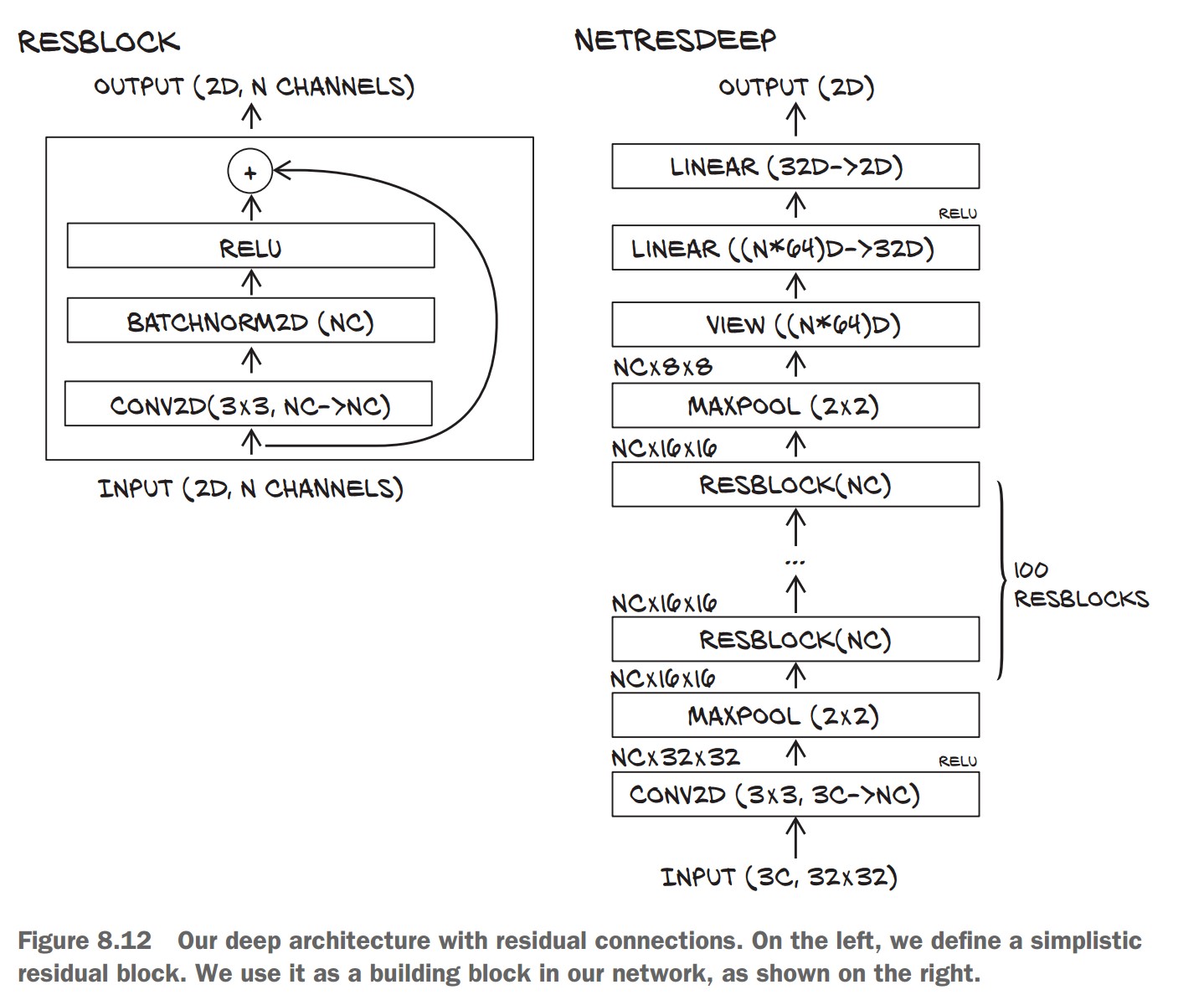
📌 Creating a Residual Block (ResBlock)
- Adds batch normalization to stabilize gradients.
- Uses Kaiming initialization for better convergence.
class ResBlock(nn.Module):
    def __init__(self, n_chans):
        super(ResBlock, self).__init__()
        self.conv = nn.Conv2d(n_chans, n_chans, kernel_size=3, padding=1, bias=False)
        self.batch_norm = nn.BatchNorm2d(num_features=n_chans)
        torch.nn.init.kaiming_normal_(self.conv.weight, nonlinearity='relu')
        torch.nn.init.constant_(self.batch_norm.weight, 0.5)
        torch.nn.init.zeros_(self.batch_norm.bias)

    def forward(self, x):
        out = self.conv(x)
        out = self.batch_norm(out)
        out = torch.relu(out)
        return out + x  # Skip connection
✅ Advantage: Helps build deeper models while maintaining stable training.
📌 Creating a Deep Residual Network
- Stacks multiple ResBlocks dynamically.
class NetResDeep(nn.Module):
    def __init__(self, n_chans1=32, n_blocks=10):
        super().__init__()
        self.n_chans1 = n_chans1
        self.conv1 = nn.Conv2d(3, n_chans1, kernel_size=3, padding=1)
        self.resblocks = nn.Sequential(*(n_blocks * [ResBlock(n_chans=n_chans1)]))
        self.fc1 = nn.Linear(8 * 8 * n_chans1, 32)
        self.fc2 = nn.Linear(32, 2)

    def forward(self, x):
        out = F.max_pool2d(torch.relu(self.conv1(x)), 2)
        out = self.resblocks(out)  # Pass through multiple ResBlocks
        out = F.max_pool2d(out, 2)
        out = out.view(-1, 8 * 8 * self.n_chans1)
        out = torch.relu(self.fc1(out))
        out = self.fc2(out)
        return out
✅ Advantage: Scales to 100+ layers without gradient vanishing issues. ⚠️ Issue: Requires careful hyperparameter tuning for stability.
Weight Initialization for Deep Networks
📌 Why Initialization Matters
- Poor initialization can lead to slow convergence or unstable gradients.
- Kaiming (He) Initialization works best for ReLU-based networks.
torch.nn.init.kaiming_normal_(layer.weight, nonlinearity='relu')✅ Ensures stable gradients throughout the network.
Key Takeaways on Model Evolution and Future Challenges
The Ever-Changing Nature of Neural Networks
📌 Deep Learning Evolves Rapidly
- New architectures emerge frequently, making older models outdated.
- Understanding core concepts helps adapt to new techniques.
- The ability to translate research papers into PyTorch code is essential.
✅ Takeaway: Focus on learning principles rather than just memorizing specific architectures.
Our Image Classifier: Achievements & Limitations
📌 What We Accomplished
- ✔ Built a convolutional neural network (CNN) to classify birds vs. airplanes.
- ✔ Explored model depth, width, regularization, and training techniques.
- ✔ Improved accuracy while reducing overfitting.
📌 Remaining Challenges
- 🔴 Object Localization: Our model works for cropped images but can't find birds/airplanes in larger scenes.
- 🔴 Overgeneralization: Model confidently misclassifies unseen objects (e.g., a cat as a bird).
- 🔴 Real-World Robustness: Uncertain performance on noisy or unexpected inputs.