ch2.toolchain_of_ds
The toolchain of data science
Setting up a development environment
What is the core purpose of these tools in a data science workflow?
- Tools aim to enhance the productivity of data scientists.
- Focus is on optimizing the key tasks: data exploration, code writing, evaluation, and result inspection.
- These actions are performed repeatedly, so reducing friction is essential.
How can infrastructure support the daily workflow of data scientists?
- No single correct answer exists; infrastructure should suit specific company and technical needs.
- The chapter offers practical and technical guidance for building an effective toolchain.
- Metaphor: data science as a jet fighter; this chapter focuses on the cockpit—the interface enabling efficient operation.
Why is the development environment critical?
- If only one part of infrastructure is set up well, prioritize the development environment.
- Many companies have robust production infrastructure but overlook the development setup.
- Workstations shouldn't be seen as basic IT assets; they are core productivity tools.
- The most important factor in project success is often the productivity of the people involved.
What defines a productive development environment?
- Productivity comes from ergonomics: optimizing human efficiency in their work environment.
- Two key activities to support:
- Prototyping – Iterative development of models and code.
- Interaction with production deployments – Connecting models to production and managing their operation.
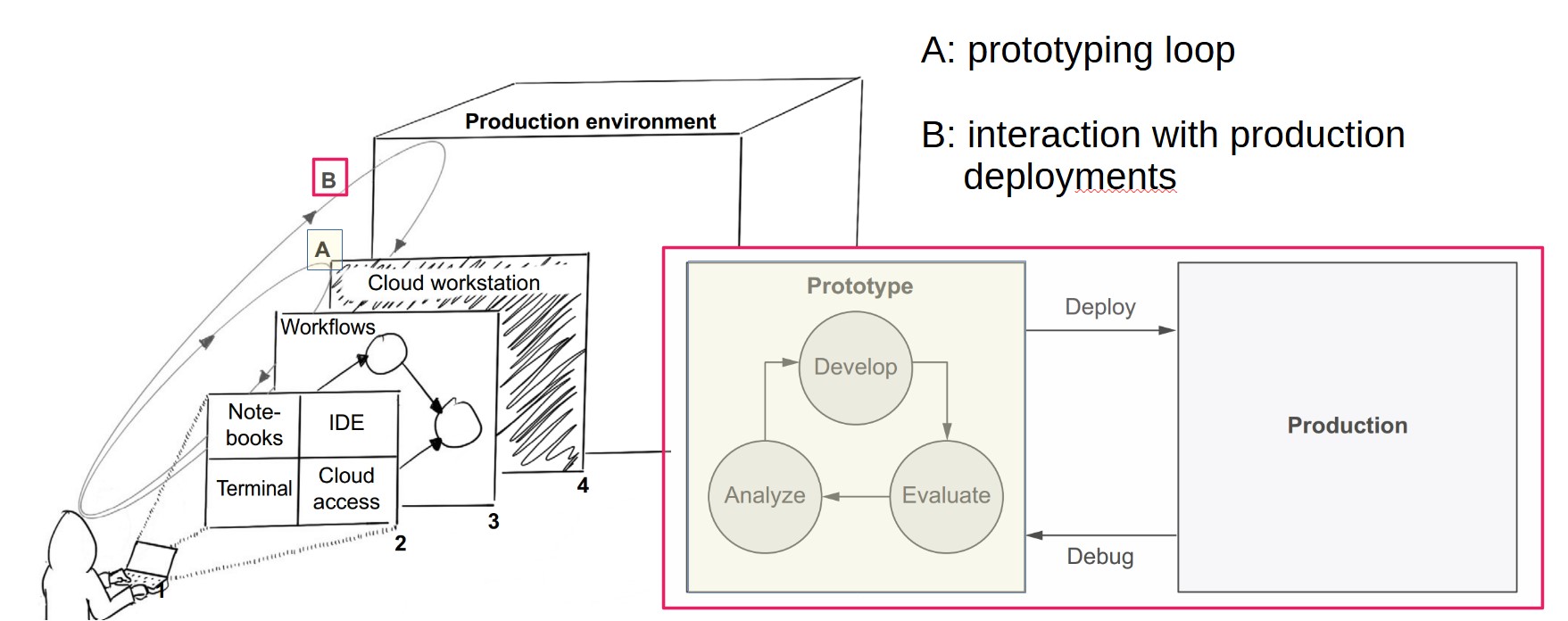
How does the prototyping loop work?
- Follows the REPL (Read-Evaluate-Print Loop) model:
- Develop code in an editor.
- Evaluate in an interactive interpreter or terminal.
- Analyze results, revise, and repeat.
- For data science, this means developing models, evaluating, analyzing, then refining.
How can we optimize the prototyping loop?
- Make iterations fast and effortless.
- Streamline each step and the transitions between them:
- Time to write and evaluate code.
- Ease of fetching and analyzing results.
- Speed of understanding outputs and modifying code.
What comes after prototyping?
- After many iterations, a promising model is ready.
- Still, key questions remain:
- Will it handle real-world data?
- Will it scale?
- Is it robust to change?
- Answering these requires moving beyond the prototyping environment.
Why deploy models as experiments?
- Observing models in real conditions reveals critical performance issues.
- Failures in production are valuable for iterative improvement.
- This is aligned with the scientific method: hypothesis → experiment → analysis.
What is the “interaction with production deployments” loop?
- Forms a higher-order loop with prototyping.
- Production is not a final step; it’s iterative and closely tied to prototyping.
- Data scientists should:
- Understand failures in production.
- Reproduce and fix issues locally.
- Improve through familiar tools and loops.
- Successful projects treat these as continuous, infinite loops of improvement.
How does continuous delivery (CD) relate to data science?
- CD tools like GitHub Actions are helpful but not a direct fit.
- Key differences between data science and traditional software:
- Correctness – Proven post-deployment via experiments.
- Stability – Data is constantly changing; automated tests aren't sufficient.
- Variety – Multiple models and ideas must be tested in parallel.
- Culture – Data scientists aren’t typically trained in DevOps; infrastructure should be user-friendly.
What role does a workstation play in data science development?
- The data scientist's workstation supports the prototyping loop: developing, testing, and deploying models and code.
- Most often, this is a personal laptop, but production systems should not run on laptops due to scalability and availability concerns.
- Development is commonly done on OS X or Windows, while production environments typically run on Linux.
- Mismatches between development and production environments can cause technical issues.
Why is the environment gap a challenge in data science?
- Development vs. production mismatches lead to debugging difficulties.
- Modeling libraries are optimized for specific hardware, increasing discrepancies.
- Large-scale data workloads amplify these differences more than typical applications.
- To bridge this gap, it is recommended to run development tasks in the cloud using a semi-persistent Linux instance or container.
What are the benefits and tradeoffs between laptop and cloud-based workstations?
| Criteria | Laptop | Cloud Instance |
|---|---|---|
| Ease of setup | Instantly familiar | Has a learning curve |
| Ease of use | Easy initially; complex deployments are harder | Harder initially; better in complex scenarios |
| Prototyping speed | Fast transitions; slower evaluations | Slower transitions; faster evaluations |
| Ease of support | Harder to monitor and support remotely | Easier to monitor; supports remote assistance |
| Scalability | Not scalable | Scalable; instance sizes are adjustable |
| Production integration | OS mismatch may cause issues | Minimal difference with production |
| Security | Higher risk (multi-purpose use, loss) | More secure; standard cloud security tools (e.g., IAM) |
| Environment consistency | Varies per user | Easier to standardize and debug |
What are notebooks and how do they support data science development?
- Notebooks allow incremental code development using cells, where code is evaluated and output appears next to the code.
- Support for rich output types (plots, graphs, tables) enhances data exploration and visualization.
- Widely used in exploratory programming, quick prototypes, analysis, and teaching.
- Notebooks enable a linear narrative—ideal for readability and understanding.
- Popular notebook tools include:
- Jupyter (Python, most widely used)
- RMarkdown (R)
- Zeppelin, Polynote (Scala)
- Mathematica (Wolfram Language)
Key Benefits:
- Fast prototyping: Write and evaluate small code snippets instantly.
- Rich visualization: Tables and plots shown inline.
- Minimal setup: Browser-based UI; easy local launch.
- Human-friendly narratives: Code and analysis embedded in one view.
- Strong ecosystem: Many libraries and platforms designed for notebooks.
Limitations:
- Not optimized for general-purpose software development.
- Hard to manage nonlinear, modular code typical in production software.
- Poor integration with standard software engineering practices:
- Version control
- Reusability across projects
- Dependency management
- Infrastructure complexity: Requires backend support (kernel, environment).
- Not suitable for production use, where notebooks add unnecessary overhead.
When should notebooks be used vs. traditional code editors?
- Use notebooks for:
- Early-stage exploration
- Data analysis and visualization
- Teaching and presentation of code/results
- Use IDEs/code editors (e.g., PyCharm, VS Code) for:
- Developing modular, reusable applications
- Managing large codebases
- Preparing code for production environments
- Modern tools like VS Code and JupyterLab support both notebooks and structured coding in one interface.
How does notebook infrastructure work and what are the setup options?
Jupyter Notebook Architecture:
- Two components:
- Frontend (UI): Web-based interface running in the browser.
- Backend (Kernel): Executes code and manages session state.
Each notebook runs on its own kernel, and multiple kernels can run in parallel.
What are the three main ways to set up notebook environments?
Option 1: Local Kernel (User's Laptop)
- Kernel runs on the local machine.
- All computation and environment management are local.
- Pros: Simple to set up; behaves like any local Python script.
- Cons: Not scalable; harder to maintain consistent environments across users.
Option 2: Remote Kernel (Cloud Workstation)
- Kernel runs on a cloud instance (e.g., EC2).
- Requires secure connection (e.g., VPN) between local editor and cloud.
- Pros:
- Scalable, persistent environment
- Easier to standardize and secure
- Cons: Requires infrastructure setup and networking configuration.
Option 3: Serverless Notebook
- No persistent server; a new ephemeral environment is spun up per session.
- Examples: Google Colab, MyBinder.org
- Pros:
- Easy to access; minimal setup
- Useful for quick, temporary work or demos
- Cons:
- No persistent state or storage
- Limited customization or integration with local tools
- Dependency reinstall needed for every session
Introducing workflows
What is a workflow and how is it structured?
- A workflow is represented as a directed graph, where:
- Nodes (circles) represent steps or tasks.
- Directed edges (arrows) represent the execution order or dependencies.
- This structure makes execution order explicit:
- Example: In a graph with A → B, step A must occur before B.
- In cases like A → B → D and A → C → D, B and C can run in parallel if only D depends on them both.
- A cyclic graph (e.g., A → B → C → A) causes infinite loops unless termination conditions are defined.
- To avoid such issues, most workflow engines restrict workflows to DAGs (Directed Acyclic Graphs).
Why should data scientists care about DAGs?
- Standardizes language: DAGs use consistent vocabulary (steps and transitions), improving collaboration and code clarity.
- Clarifies execution order: Helps manage complex, non-linear data workflows explicitly.
- Enables parallelism: When dependencies allow, tasks can run concurrently, boosting performance.
How are workflows executed in practice?
- All workflow systems must address:
- Code abstraction (what to run)
- Execution environment (where to run)
- Orchestration logic (how to run)
Three core execution concerns:
-
What code to run:
- Defined in the architecture layer, which includes the workflow's user interface.
- Interfaces vary:
- Graphical (drag-and-drop)
- Configuration-based (YAML/JSON)
- Code-based (Python, etc.)
- Determines how naturally data science tasks can be expressed.
-
Where to run the code:
- Defined in the compute resources layer.
- Affects scalability and performance:
- Example: Running 600 tasks on one 16-core machine vs. a 100-node cluster changes runtime dramatically.
-
How to manage execution order:
- Managed by the scheduler (orchestrator) layer.
- Responsibilities include:
- Following DAG-defined topological order.
- Sending tasks to compute resources.
- Monitoring and retrying failed tasks.
- Alerting users on failure.
- Providing observability (e.g., GUI dashboards).
What types of schedulers exist?
- Static DAG schedulers: DAG must be fully defined before execution begins.
- Dynamic DAG schedulers: DAG can evolve during execution.
- Each has trade-offs in terms of flexibility, complexity, and runtime behavior.
trade-offs
- Technical choices across these layers impact:
- Scalability
- Fault tolerance
- User experience
- Although many workflow tools exist and claim to support DAGs, their internal implementations and design trade-offs differ significantly.
How should data scientists evaluate workflow frameworks?
-
The ecosystem of workflow tools is large and fast-changing, making exhaustive lists impractical.
-
Evaluation should focus on a three-part rubric reflecting essential infrastructure concerns:
-
Architecture
- How workflows are authored and represented
- Ease of use and expressiveness for data science applications
-
Scheduler
- How workflows are triggered, executed, monitored
- Fault tolerance and operational robustness
-
Compute Resources
- Where code runs and how compute is allocated
- Ability to support diverse hardware (e.g., CPUs, GPUs) and scalability
-
-
Different organizations should weigh these dimensions differently depending on size, workload, and team composition.
How do selected frameworks compare?
| Framework | Architecture | Scheduler | Compute |
|---|---|---|---|
| Apache Airflow | Python code; not data science–specific | GUI; scheduler not HA | Supports many backends via executors |
| Luigi | Python code; not data science–specific | Bare-bones; not HA | Runs locally by default; can delegate to external systems |
| Kubeflow Pipelines | Python; designed for data science workflows | GUI; uses Argo; some HA via Kubernetes | Runs on Kubernetes |
| AWS Step Functions | JSON config using Amazon States Language | HA by design; AWS-managed | Integrated with AWS services |
| Metaflow | Python; tailored for data science | Local and HA scheduler options (e.g., Step Functions) | Supports local and cloud compute platforms |
What are the main characteristics of these frameworks?
-
Apache Airflow
- Open-source, Python-based
- Not specific to data science
- Rich ecosystem and managed options available
-
Luigi
- Python-based, dynamic DAGs via data dependencies
- Simpler than Airflow but lacks high availability
-
Kubeflow Pipelines
- Part of the Kubeflow suite (Kubernetes-based)
- Targets ML workflows
- Uses Argo for orchestration under the hood
-
AWS Step Functions
- Managed service; DAGs written in JSON
- High availability and long-running workflows
- Strong AWS integration
-
Metaflow
- Pythonic interface optimized for end-to-end data science
- Balances local prototyping and scalable production with cloud backends
What factors should guide framework selection?
-
Data scientist productivity
- Architecture should align with how data scientists build applications.
- Consider full stack needs (not just workflows).
-
Operational robustness
- Systems should be scalable, fault-tolerant, and highly available.
- Track record and real-world usage matter.
-
Compute integration
- Smooth scaling and support for varied compute (e.g., GPU) can significantly improve efficiency.